
- Where
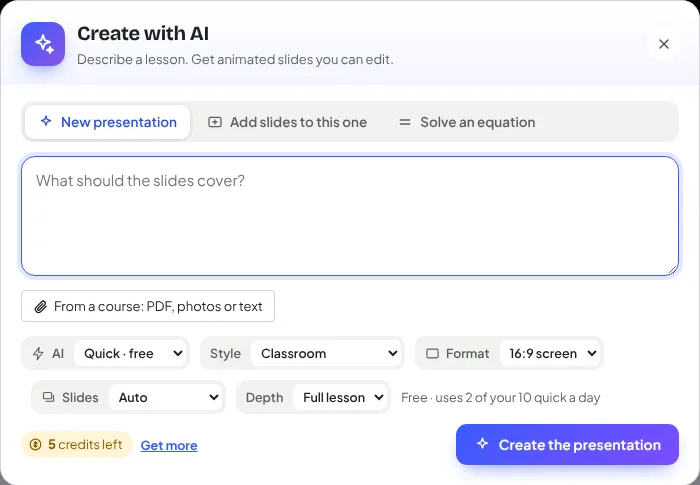
- ✨ button next to Share; also on the projects page
- Purpose
- Turn a request into an animated deck made of real, editable Tracé objects
- How
- Open Create with AI → New presentation → describe the lesson → check and edit the outline → Create the presentation
- Inputs
- A request (up to 2,000 characters); AI: Quick or Best; Style: Classroom, Lecture, Business, Young learners, Expert; Format: 16:9, 4:3, 1:1, 9:16; Slides: Auto or a number; Depth: Overview or Full lesson
- Output
- Slides with equations, graphs, diagrams and click-by-click steps, all editable
- Limits
- Auto makes 3 to 6 slides; up to 30. Best uses credits (1 per part of about 4 slides past 6); Quick is free, 10 a day (50 with Pro)
Every feature
The complete inventory of what Tracé does today: 36 features of the app and all 145 objects, with where to find each one, what it needs and its limits. Screenshots are taken from the real editor.
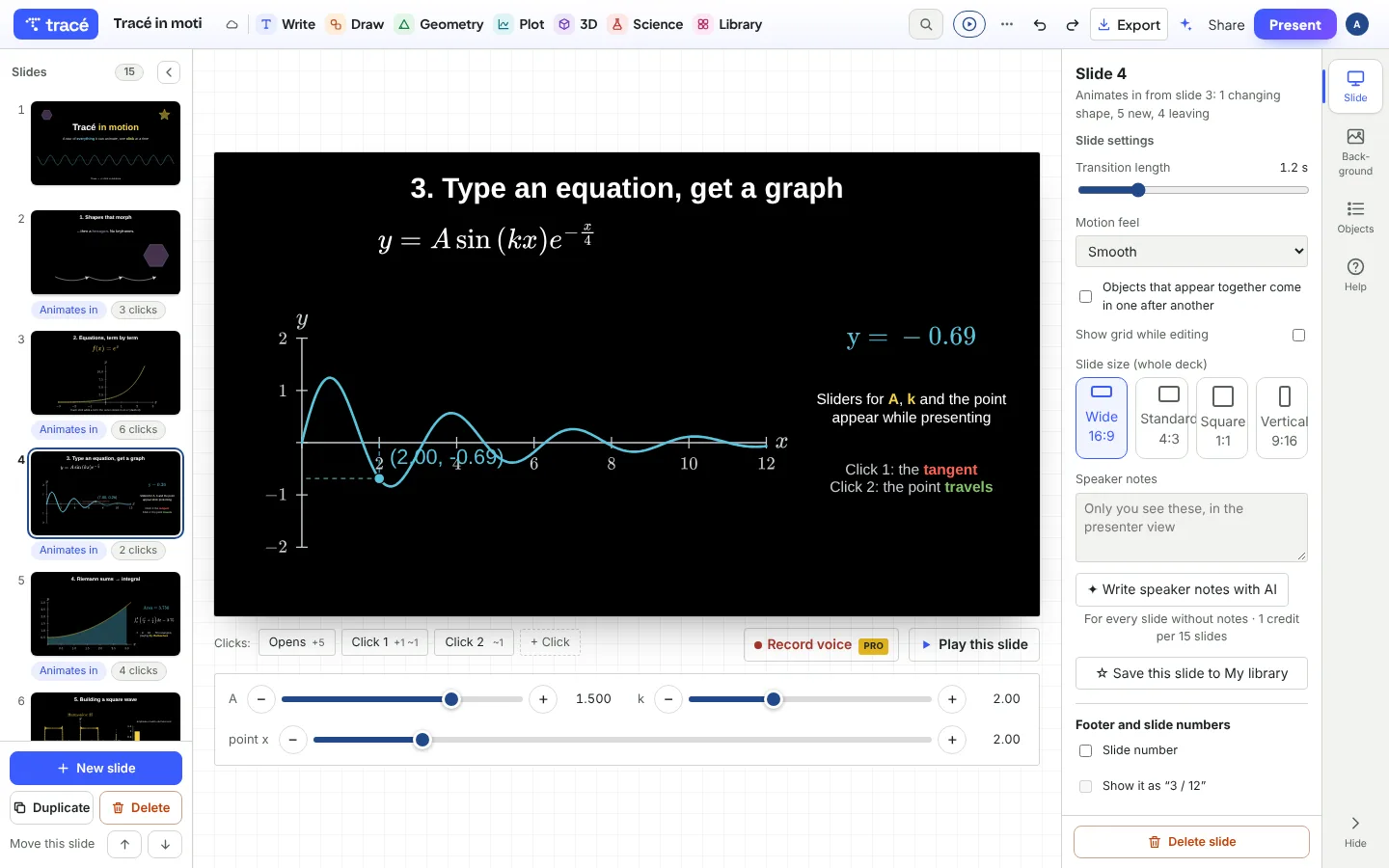
The app
Priority shows how central a feature is to making and teaching a lesson.
- Where
- Create with AI → From a course: PDF, photos or text (or drop the file on the window)
- Purpose
- Rebuild an existing course or lecture notes as animated slides
- How
- Attach the file → optionally say what to keep, add or change → check the outline → build
- Inputs
- One PDF up to 10 MB, or up to 12 photos of pages, or .txt/.md files; pasting more than 1,500 characters of text also counts as a course
- Output
- A deck that follows the course (8 slides by default)
- Limits
- Reading the course costs 1 more credit. Word and PowerPoint files must be saved as PDF first. Text is read up to 60,000 characters
- Where
- Shown inside Create with AI before building
- Purpose
- Check the plan before spending credits on slides
- How
- Rename the deck, edit each slide title and idea, pick its kind, add or remove slides, then build
- Inputs
- The proposed plan
- Output
- The deck follows the outline slide by slide
- Limits
- Slide kinds: Opening, Section, Scene, Worked example, Quiz, Compare, Key number, Recap, Explain
- Where
- Create with AI → Add slides to this one
- Purpose
- Extend a deck that is already open
- How
- Describe what to add → build
- Inputs
- A request; the titles of the current slides are sent as context
- Output
- New slides after the current one
- Limits
- Not available from the projects page
- Where
- Create with AI → Solve an equation
- Purpose
- Show a worked solution step by step
- How
- Type the equation → Solve it step by step
- Inputs
- An equation or problem
- Output
- Solution slides
- Limits
- No file attachment in this mode
- Where
- Create with AI → AI
- Purpose
- Choose between a free, faster model and the strongest one
- How
- Pick Quick · free or Best · credits; the choice is remembered
- Limits
- An unreadable Quick answer is rewritten by Best for free. A site-wide daily cap applies to Quick
- Where
- Slide panel → Write speaker notes with AI
- Purpose
- Write what to say for each slide
- How
- Click the button
- Inputs
- The slides
- Output
- Notes for every slide that has none
- Limits
- 1 credit per 15 slides
- Where
- Plot → Make your own → Custom animation → Write the script with AI
- Purpose
- Describe a motion that no object covers and have it written
- How
- Describe it → check it plays → adjust
- Inputs
- A description (and the current animation, to change it)
- Output
- A custom animation object
- Limits
- Uses credits
- Where
- Plot → Calculus and Fourier → Fourier drawing → Or describe it
- Purpose
- Get an outline for the epicycle drawing from words
- How
- Type e.g. “a sitting cat” → Draw it with AI
- Inputs
- Up to 200 characters
- Output
- An outline of 256 points
- Limits
- 1 credit. A picture can be traced for free instead
- Where
- Create with AI without an account
- Purpose
- Let a visitor see the AI work on their own lesson before signing up
- How
- Describe or attach → see a short deck → sign up to keep going
- Inputs
- A request or a PDF
- Output
- A deck of about 4 slides
- Limits
- 2 a day per address; site-wide daily limit; new accounts start with 5 credits
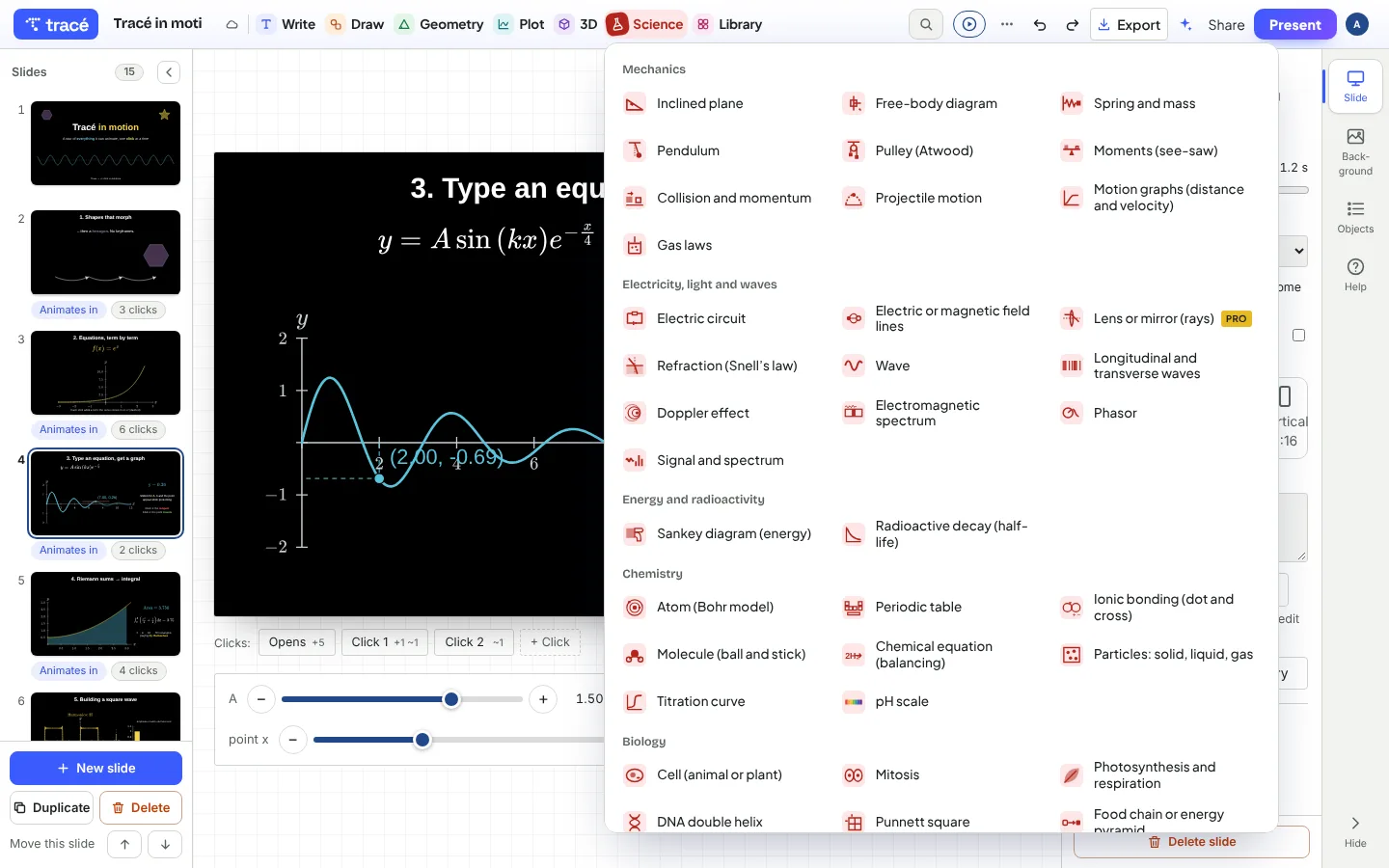
- Where
- Toolbar: Write, Draw, Geometry, Plot, 3D, Science, Library
- Purpose
- Add any of the 145 object types
- How
- Open a menu → click an object → set it up on the right
- Output
- An object on the slide
- Limits
- 12 objects need Pro (marked PRO)
- Where
- Search box in the toolbar, Ctrl+K
- Purpose
- Find an object or action by name
- How
- Type a few letters → Enter
- Inputs
- Words
- Output
- Opens or adds the feature
- Where
- Under the slide: Opens, Click 1, Click 2, + Click
- Purpose
- Build a slide step by step: what appears, moves or changes on each click
- How
- Select a click → change objects → they belong to that click
- Output
- A slide that plays click by click
- Where
- Automatic; shown as “Animates in from slide N”
- Purpose
- Objects shared by two slides move and change shape instead of cutting
- How
- Duplicate a slide → change it
- Output
- A smooth transition
- Limits
- Transition length and Motion feel are set per slide
- Where
- Right panel → Slide
- Purpose
- Transition length, motion feel, one-after-another entrances, grid, slide size, speaker notes, footer and slide numbers
- How
- Change the settings
- Limits
- Slide size applies to the whole deck: 16:9, 4:3, 1:1, 9:16
- Where
- Right panel → Background
- Purpose
- Colour or picture behind the slide
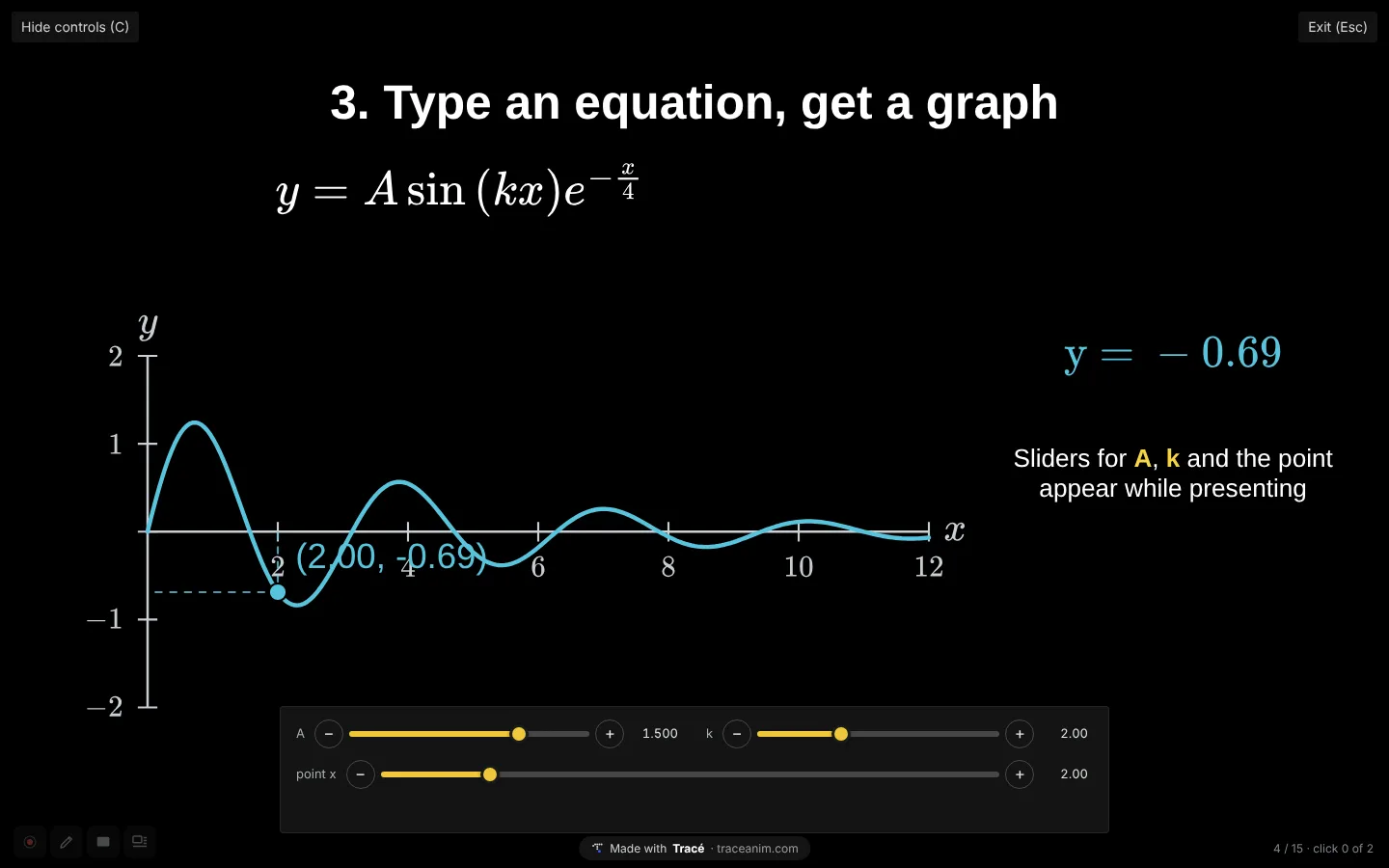
- Where
- An equation letter → Live slider; a graph → Slider for the point; 3D axes → Turn and tilt sliders
- Purpose
- Change a value while presenting and watch everything linked to it update
- How
- Tick the option → try it under the slide
- Output
- Sliders in the editor and while presenting
- Limits
- Values reset on the next slide
- Where
- Save this slide to My library; Library menu
- Purpose
- Reuse your own slides and drawings
- Where
- Under the slide → Record voice
- Purpose
- Narrate each step; it plays while presenting and in the video
- How
- Record per click
- Inputs
- Microphone
- Output
- Audio in the deck
- Limits
- Pro
- Where
- Write and Draw menus; drag and drop
- Purpose
- Pictures, SVG drawings, video, audio, YouTube or Vimeo, 3D models
- How
- Add the object → choose the file or paste a link
- Inputs
- SVG up to 3 MB; video up to 40 MB; audio up to 15 MB; 3D model up to 40 MB
- Output
- Media inside the deck
- Limits
- 3D models need Pro. Online, a deck is up to 2 MB free and 20 MB with Pro
- Where
- Keyboard
- Purpose
- Work faster
- Inputs
- Ctrl+Z / Ctrl+Shift+Z undo and redo; Ctrl+D duplicate; Ctrl+C / Ctrl+X; Delete; Esc deselect
- Where
- ⋯ menu → Learn; Tour button
- Purpose
- Learn by doing inside the editor
- How
- Pick a chapter → follow the steps
- Where
- Logo → projects page
- Purpose
- Open, start or organise decks
- How
- Pick a template or a blank deck
- Output
- A new project
- Limits
- Badges show where each project is kept
- Where
- ⋯ menu → Language
- Purpose
- Use the editor in English, French, Spanish, Portuguese or Arabic
- Where
- Present button
- Purpose
- Play the deck from the current slide, click by click
- How
- Present → click, →, Space, Page Down or Enter; ←/Page Up back; Esc to leave
- Limits
- Free plan shows a small “Made with Tracé” badge
- Where
- While presenting: C, or Show controls
- Purpose
- Show or hide the live sliders
- Limits
- Hidden by default on a phone held sideways
- Where
- While presenting: L laser, P pen, E erase, B black, W white
- Purpose
- Point, annotate, or pause the audience’s attention
- How
- Press the key again (or Esc) to stop
- Limits
- Not yet in the written guide
- Where
- While presenting: S
- Purpose
- A second window with notes and what comes next
- How
- Press S → move the window to your own screen
- Limits
- Pro. Pop-ups must be allowed
- Where
- Any phone or tablet
- Purpose
- Present without a keyboard
- How
- Swipe or tap; tap the left quarter to go back
- Purpose
- Present without internet
- How
- Open the deck once while online
- Limits
- Maths fonts must have loaded once
- Where
- Share button
- Purpose
- Anyone can watch on any device, with live sliders, without an account
- How
- Share → copy the link
- Output
- A /v/ link
- Limits
- The deck must be saved online (size limits above)
- Where
- Export → Video (MP4)
- Purpose
- Turn every click into a video, with your voice
- How
- Choose 720p or 1080p and seconds per step
- Output
- An MP4 file
- Limits
- Made in the browser, so long decks take time
- Where
- Export → PDF or print
- Purpose
- Handouts
- Output
- One slide per page, notes optional
- Limits
- Animations become still pages
- Where
- Export → Picture of this slide
- Purpose
- A slide for a document or post
- Output
- PNG, 1920 pixels wide
- Where
- Export → Project file; Export → Import a project file
- Purpose
- Keep a copy, send it, open it again
- Output
- A project file
- Where
- Export → Python script (Manim)
- Purpose
- A starting point for a hand-tuned video
- Output
- A .py file with drawings and images embedded
- Limits
- Pro
The 145 objects
Write 25, Draw 15, Geometry 19, Plot 22, 3D 17, Science 47. 12 need Pro. “AI builds it” means the AI builder can place it on a slide; “can loop” means it can keep playing while you talk.
| Object | What it is | Main settings | |
|---|---|---|---|
| TextWrite · Text and maths | A title or a sentence | Text | can loop |
| EquationWrite · Text and maths | Type maths like y = x^2, it is typeset for you | Write it as, Equation, LaTeX, Font size, Show only the first terms (0 = all), Highlight a term (e.g. P_j), Highlight colour | can loop |
| Bullet listWrite · Text and maths | Points that appear one at a time | One item per line, Line spacing, Items shown (0 = all, animate to reveal), Highlight item (0 = none), Highlight colour | can loop |
| CodeWrite · Text and maths | Program code, coloured | Language, Code, Text size, Line numbers, Lines shown (0 = all, animate to reveal), Highlight line (0 = none) | AI builds it can loop |
| MatrixWrite · Text and maths | Numbers in rows and columns | Entries, Size | AI builds it can loop |
| TableWrite · Text and maths | A grid of values with headings | Rows, First row is a header, Rows shown (0 = all, animate it to reveal rows), Highlight row (0 = none), Highlight colour, Table design, Lines, Line colour | AI builds it can loop |
| CounterWrite · Text and maths | A number that counts up on a click | Value comes from, Counts to, Count automatically when the slide starts, Counts from, Counting time (seconds), Show as a clock (m, Decimals, Text before the number, e.g. Speed | can loop |
| timerWrite · Text and maths | Counts down m:ss when the slide appears | can loop | |
| CalloutWrite · Text and maths | A speech bubble or a note pointing at something | Text, Style, Pointer x, Pointer y, Size, Bold, Fill colour, Text colour | AI builds it can loop |
| Quiz questionWrite · Classroom | A multiple-choice question; the answer shows on a click | Question (maths between $ signs), Answers, one per line (maths between $ signs), Correct answer (1 = first), Show the answer (set to 1 on a click), Layout, Size, Width | AI builds it can loop |
| Hidden answer cardWrite · Classroom | A question with its answer hidden; animate Shown to 1 on a click to reveal it | Question, Answer, Text on the cover, Shown (animate it to 1 on a click), Width, Height, Text size, Card colour | AI builds it can loop |
| Fill in the blanksWrite · Classroom | A sentence with [gaps]; each click fills the next one | Text, Gaps filled (animate it, one per click), Width, Text size, Gap colour, Answer colour | AI builds it can loop |
| QR code (scan to join)Write · Classroom | A QR code for any link: students scan it to open your quiz, form or lesson | Link or text (up to 230 characters), Title above, Show the link under it, Size, Title size, Square colour | AI builds it can loop |
| TimelineWrite · Classroom | Dates along a line with short notes, one event per click | Events, one per line (date, Events shown (animate it, one per click), Width, Line thickness | AI builds it can loop |
| Cycle diagramWrite · Classroom | Any cycle in a ring of boxes and arrows: rock, carbon, life or cell cycle | Stages, in order (commas), Words on the arrows, in order (commas), Title in the middle, Size, Box width, Line thickness | AI builds it can loop |
| Clock (telling the time)Write · Number and algebra | An analogue clock with the digital time and the time in words; run it or animate the time | Time in minutes after midnight (animate it, or Loop, Size, Numbers, Minutes round the outside, Digital time, Time in words, am / pm, 24-hour | AI builds it can loop |
| Place value blocksWrite · Number and algebra | Hundreds squares, tens rods and ones cubes for any number, with its expanded form | Number (up to 9999), animate it, Expanded form, Block size | AI builds it can loop |
| Column method (+, −, ×)Write · Number and algebra | Column addition, subtraction (with borrowing) or multiplication, one column per click, carries shown | Top number, Bottom number, Operation, Columns done (animate it, one per click), Show carries and borrows, Write the answer at the end, Size, Column width | AI builds it can loop |
| Fraction wallWrite · Number and algebra | Rows of 1, ½, ⅓… side by side; highlight 1/2, 2/4, 3/6 to see they are equal | Rows (denominators, commas), Highlight fractions, e.g. 1/2, 2/4, 3/6, Label the pieces, Width, Row height | AI builds it can loop |
| Times table gridWrite · Number and algebra | A 10×10 or 12×12 times table; light up a × b, or all the multiples of a number | Size, Row to light (0 = none), Column to light, Light the multiples of (0 = none), Square size | AI builds it can loop |
| Equation balance (solve for x)Write · Number and algebra | A scale balancing 2x + 3 = 11: take 3 from both sides, then divide, one step per click | Left side, e.g. 2x + 3, Right side, e.g. 11, Step (0, 1, 2), animate it | AI builds it can loop |
| Area model (expanding brackets)Write · Number and algebra | (x + 2)(x + 3) as a rectangle of parts, giving x² + 5x + 6 | First bracket, e.g. x + 2, Second bracket, e.g. x + 3, Parts filled (animate it), Write the result | AI builds it can loop |
| Sequences and patterns (nth term)Write · Number and algebra | Dot patterns or numbers, term by term, with the nth term | Sequence, First term, Difference d, Ratio r, Terms, Terms shown (animate it, one per click), nth term, Dot size | AI builds it can loop |
| Bar model (ratio and percentages)Write · Number and algebra | Split a total in a ratio, or find a percentage, as a bar model | Problem, Total, Ratio, e.g. 3, Names of the parts (commas), Percentage, Built (animate it), Value in each box, Width | AI builds it can loop |
| Matrix transformationWrite · Number and algebra | A 2×2 matrix moving the grid, the unit square and the basis vectors; the area scales by the determinant | a (top left), b (top right), c (bottom left), d (bottom right), Applied (animate it from 0 to 1), Matrix and determinant, Grid size, Square size | AI builds it can loop |
| ImageDraw · Pictures, video and sound | A photo or picture from your computer | Image, Width | can loop |
| VideoDraw · Pictures, video and sound | A video file or a YouTube link that plays on a click | Video, Or a YouTube, Vimeo or video link, Width, Starts playing, On click number, Start at (seconds), Stop at (seconds, 0 = the end), Play in a loop | can loop |
| SoundDraw · Pictures, video and sound | Music, a sound effect or narration from a file | Sound, Or a link to a sound file, Starts playing, On click number, Start at (seconds), Stop at (seconds, 0 = the end), Play in a loop, Volume | can loop |
| CircleDraw · Shapes | A round shape | Radius, Fill, Line thickness | can loop |
| EllipseDraw · Shapes | An oval | Width, Height, Fill, Line thickness | AI builds it can loop |
| RectangleDraw · Shapes | A square or rectangle | Width, Height, Rounded corners, Fill, Line thickness | can loop |
| PolygonDraw · Shapes | Triangle, hexagon: any number of sides | Sides, Radius, Fill, Line thickness | AI builds it can loop |
| StarDraw · Shapes | A star with as many points as you like | Points, Radius, Inner size, Fill, Line thickness | can loop |
| Sector or ringDraw · Shapes | A slice of a circle, or a ring | Radius, Inner radius (0 = pie slice), Start angle (°), End angle (°), Fill, Line thickness | AI builds it can loop |
| LineDraw · Lines and marks | A straight line between two points | Length along x, Length along y, Dashed, Line thickness | can loop |
| ArrowDraw · Lines and marks | Points at something, can draw itself | Length along x, Length along y, Tips at both ends, Bend (°) | can loop |
| ArcDraw · Lines and marks | Part of a circle’s edge | Radius, Start angle (°), Sweep (°), Line thickness | AI builds it can loop |
| DotDraw · Lines and marks | A small round point | can loop | |
| BraceDraw · Lines and marks | A curly bracket to group things | Width, Label (LaTeX, optional), Points | AI builds it can loop |
| Cross markDraw · Lines and marks | A cross or a tick | Size | can loop |
| Labelled pointGeometry · Shapes and angles | A named point such as A | Label (LaTeX), Label side, Label size, Dot size | AI builds it can loop |
| TriangleGeometry · Shapes and angles | Labels its sides and angles itself | A x, A y, B x, B y, C x, C y, Corner names (A, B, C), Side names (a, b, c), opposite each corner | AI builds it can loop |
| AngleGeometry · Shapes and angles | Marks an angle, with θ | First ray (°), Second ray (°), Arc radius, Ray length, Draw the rays, Square mark when it is 90°, Label (LaTeX), Line thickness | AI builds it can loop |
| Angles in parallel linesGeometry · Shapes and angles | A line crossing two parallel lines: alternate, corresponding, co-interior or all eight angles | Angles, Angle (°), animate it, Gap, Width, Line thickness | AI builds it can loop |
| Polygon anglesGeometry · Shapes and angles | A regular polygon with its interior and exterior angles and the angle sum | Sides (animate it), Size, Interior angles, An exterior angle, Write the angle sum, Fill colour, Line thickness | AI builds it can loop |
| BearingsGeometry · Shapes and angles | A three-figure bearing measured clockwise from North, with the back bearing | Bearing (°), animate it, From, To, Back bearing, Write the rule, Length, Line thickness | AI builds it can loop |
| Similar shapes (scale factor)Geometry · Shapes and angles | A shape and its enlargement with every side labelled, the scale factor and the area factor | Base, Height, Shape, Scale factor, Enlarged (animate it), Scale and area factors, Size, Line thickness | AI builds it can loop |
| FractionGeometry · Shapes and angles | A pie or bar showing a fraction | Numerator, Denominator, Style, Show the fraction, Size, Fill colour, Line thickness | AI builds it can loop |
| Venn diagramGeometry · Shapes and angles | Overlapping circles for sets | Sets, Shade, Names (A, B, C), Circle radius, Distance between circles (animate it), Shade colour, Shade opacity, Line thickness | can loop |
| Unit circleGeometry · Trigonometry and circles | A turning angle with sin and cos as lengths, the exact values and the sine curve it traces | Angle θ (°), animate it, Radius, Show sin and cos, Show the values, Trace the sine curve, Curve length, Mark the special angles, Marks in radians | AI builds it can loop |
| Right triangle (SOH CAH TOA)Geometry · Trigonometry and circles | Opposite, adjacent and hypotenuse labelled; sin, cos and tan update as the angle changes | Angle θ (°), Hypotenuse length, Highlight, Name the sides, Show sin, cos, tan, Show the values, Show SOH CAH TOA, Fill colour | AI builds it can loop |
| Circle theoremsGeometry · Trigonometry and circles | Angle at the centre, angle in a semicircle, tangent and radius, cyclic quadrilateral: move the point and the angles update | Theorem, Move the point (°), animate it, Radius, Write the rule, Line thickness | AI builds it can loop |
| Pythagoras' theoremGeometry · Proofs, coordinates and transformations | Squares on the three sides, with a² + b² = c² worked out | Side a, Side b, Squares drawn (animate it), Name of a, Name of b, Name of c, Label the areas, Show the numbers | AI builds it can loop |
| Coordinate geometryGeometry · Proofs, coordinates and transformations | Two points with rise, run, gradient, distance, midpoint and the equation of the line | A, A, B, B, Show rise and run, Gradient, Distance, Midpoint | AI builds it can loop |
| Transformation (reflect, rotate, translate, enlarge)Geometry · Proofs, coordinates and transformations | A shape on a grid and its image; set Amount to 0 and animate it on a click to watch it move | Transformation, Amount (0 = start, 1 = done), animate it, Shape corners (name, Mirror line, Rotation (°, anticlockwise), Move right, Move up, Scale factor | AI builds it can loop |
| Number planeGeometry · Proofs, coordinates and transformations | A grid with x and y axes | Matrix a (x → x), Matrix b (y → x), Matrix c (x → y), Matrix d (y → y), Show basis vectors î and ĵ, x from, x to, y from | AI builds it can loop |
| Area of a circle (sectors)Geometry · Area, constructions and nets | A circle cut into sectors that rearrange into a near rectangle: A = πr × r | Sectors, Rearranged (animate it from 0 to 1), Radius, Labels, Colour 1, Colour 2, Line thickness | AI builds it can loop |
| Constructions (compass and ruler)Geometry · Area, constructions and nets | Perpendicular bisector or angle bisector, one compass step per click | Construction, Step (animate it, one per click), Angle (°), Size, Say each step, Arcs, Result line, Line thickness | AI builds it can loop |
| Net of a cube (folds)Geometry · Area, constructions and nets | Six squares that fold up into a cube, and back | Folded (animate it, or Loop, Turn (°), Tilt (°), Size, Number the faces, Caption, Line thickness | AI builds it can loop |
| Custom animationPlot · Make your own | Write a few lines and make your own: points, vectors and curves that move with time t, with trails and live values | Script, When it plays, How long it lasts (s), Time shown when still (s), View, x to, y from, y to | can loop |
| GraphPlot · Graphs | Type an equation, get its graph | Function from equation, Curve, Series, Number of terms (animate it), Slider for the number of terms while presenting, Period (Fourier), Show the exact curve, dashed, y = f(x), e.g. sin(x) e^(-x/4) | can loop |
| Parametric curvePlot · Graphs | Spirals and loops from x(t) and y(t) | Curve from equation, x(t), y(t), t from, t to (2π ≈ 6.2832), Drawn so far (animate 0 → 1 to trace it), Show a moving dot at the tip, Line thickness | AI builds it can loop |
| Polar plotPlot · Graphs | Roses and spirals from r = f(θ) | Curve from equation, r(θ), e.g. 1 + cos(theta), θ from, θ to (2π ≈ 6.2832), Largest radius shown, Size on the slide, Drawn so far (animate 0 → 1), Moving dot at the tip | AI builds it can loop |
| Number linePlot · Graphs | A ruler of numbers | From, To, Tick step, Length, Show numbers, Size of the numbers | AI builds it can loop |
| VectorPlot · Graphs | An arrow with a size and a direction | Components from equation, x component, y component, Label (LaTeX, optional) | can loop |
| Vector fieldPlot · Graphs | Arrows everywhere, showing a flow | Field from equation, Draw as, Fx(x, y), Fy(x, y), x from, x to, y from, y to | AI builds it can loop |
| Complex planePlot · Graphs | Complex numbers as points | Map w = f(z), e.g. z^2, exp(z), 1/z, sin(z), Apply the map (animate 0 → 1), Show 1, 2, i, 2i …, Size of the numbers, Re from, Re to, Im from, Im to | AI builds it can loop |
| Derivative explorerPlot · Calculus and Fourier | A tangent slides along f while f′ is drawn | f(x) =, Sweep the tangent when it appears, Sweep time (seconds), Tangent at x, x from, x to, f from (0 = auto), f to | PRO AI builds it can loop |
| Fourier drawingPlot · Calculus and Fourier | Turning circles draw a shape | Draw itself when it appears, Drawing time (seconds), Shape, My own points (x, y per line), Drawn, Number of circles, Size, Show the turning circles | PRO AI builds it can loop |
| Differential equationPlot · Calculus and Fourier | dy/dx or a system: direction field, solution curves that draw themselves, Euler steps one per click | Equation, dy/dx =, x′ =, y′ =, Starting points, one “x, y” per line, Direction field, Solution drawn with, Euler step h | AI builds it can loop |
| Level curves and heat mapPlot · Calculus and Fourier | Contour lines of f(x, y) over a heat map | f(x, y) =, Level curves, Heat map (colour by height), Label the levels, x from, x to, y from, y to | AI builds it can loop |
| Root finding (Newton, bisection)Plot · Calculus and Fourier | Newton’s tangents or bisection, one step per click, with the values | Method, f(x) =, Start x₀, Interval from a, Interval to b, Steps shown (animate it, one per click), Show the values, x from | AI builds it can loop |
| Probability distributionPlot · Statistics and probability | Normal, binomial, Poisson… with a shaded probability | Distribution, Mean μ (normal), Standard deviation σ (normal), Number of trials n (binomial), Probability p (binomial), Rate λ (Poisson), From a (uniform), To b (uniform) | AI builds it can loop |
| Statistics chartPlot · Statistics and probability | Histogram, box plot, dot plot or scatter with a line of best fit | Chart, Data (numbers, or “x, y” per line for a scatter), Bars (0 = automatic), Show the mean, Show the median, Labels and counts, Numbers on the axis, Line of best fit (scatter) | AI builds it can loop |
| Probability treePlot · Statistics and probability | Branches with probabilities, revealed level by level | First branches (label, Second branches; use | to give each first branch its own, Levels shown, Show the outcomes, Width, Height, Line thickness | AI builds it can loop |
| Dice and coins (probability)Plot · Statistics and probability | Roll dice or flip coins many times: the bars approach the expected line | Experiment, Rolls (animate it, Another set of results, Counts on the bars, Width, Height, Bar colour, Line thickness | AI builds it can loop |
| Monte Carlo estimate of πPlot · Statistics and probability | Random points estimate π: animate the number of points | Points (animate it), Random seed, Show the estimate of π, Size | AI builds it can loop |
| FractalPlot · Chaos, fractals and numbers | Mandelbrot, Julia (animate c), Koch snowflake, Sierpinski, fractal tree: animate the depth | Fractal, Depth (animate it), Branch angle (°), c, real part (animate it), c, imaginary part (animate it), Iterations, Zoom (animate it), Centre, real part | AI builds it can loop |
| Logistic map (chaos)Plot · Chaos, fractals and numbers | x → r x (1 − x): cobweb, values over time, the bifurcation diagram | Show, r, growth rate (animate it), x₀, Steps shown (animate it), r from, r to, Width, Height | AI builds it can loop |
| Cellular automatonPlot · Chaos, fractals and numbers | Rule 30, 90, 110…: one generation per row, animate the generations | Rule (0 to 255), e.g. 30, 90, 110, Cells across, Generations shown (animate it), Start with, Random seed, Width, Height | AI builds it can loop |
| Primes (sieve, Ulam spiral)Plot · Chaos, fractals and numbers | The sieve of Eratosthenes stage by stage, or the Ulam spiral | Show, Numbers in the grid, Primes used to cross out (animate it), Numbers in the spiral, Width, Height | AI builds it can loop |
| sphere33D · Solids | A ball | can loop | |
| cube33D · Solids | A cube | can loop | |
| box33D · Solids | A box with any sides | can loop | |
| ellipsoid33D · Solids | A stretched ball | can loop | |
| cylinder33D · Solids | A can shape | can loop | |
| cone33D · Solids | A cone | can loop | |
| prism33D · Solids | A prism on any base | can loop | |
| pyramid33D · Solids | A pyramid | can loop | |
| torus33D · More solids | A ring doughnut | PRO can loop | |
| tetrahedron33D · More solids | 4 triangle faces | PRO can loop | |
| octahedron33D · More solids | 8 triangle faces | PRO can loop | |
| dodecahedron33D · More solids | 12 pentagon faces | PRO can loop | |
| icosahedron33D · More solids | 20 triangle faces | PRO can loop | |
| 3D axes3D · Scenes and surfaces | A surface z = f(x, y) you can turn | Shape from equation, Shape, z = f(x, y), x(u, v), y(u, v), z(u, v), u from, u to (π ≈ 3.1416) | PRO AI builds it can loop |
| shapes3d3D · Scenes and surfaces | Several solids in one 3D scene | PRO can loop | |
| arrow33D · Scenes and surfaces | An arrow in space | PRO can loop | |
| Import a 3D model3D · Your own models | Your own OBJ or STL file, turning in 3D | Model, Turn (°), Tilt (°), Size, Shading, Show the triangles | PRO can loop |
| Inclined planeScience · Mechanics | A slope with a block and its forces | Angle of the slope (°), Block position, Length of the slope, Block size, Show the angle, Angle label (maths), Show the forces (weight, normal), Show friction | AI builds it can loop |
| Free-body diagramScience · Mechanics | Forces on an object, with labels | Forces (label, Arrow size, Box size, Show the box | AI builds it can loop |
| Spring and massScience · Mechanics | Stretch it, or let it oscillate | Stretch, Oscillation size, Direction, Length at rest, Coils, Mass size, Mass label, Show the rest position | AI builds it can loop |
| PendulumScience · Mechanics | Set the angle, or let it swing | Angle (°), Swing size (°), Length of the string, Bob size, Show the swing, Show the angle, Angle label (maths), Show the vertical | AI builds it can loop |
| Pulley (Atwood)Science · Mechanics | Two masses over a pulley | Movement, Movement size, Left mass label (maths), Right mass label (maths), Pulley radius, Rope length, Mass size, Show the weights | AI builds it can loop |
| Moments (see-saw)Science · Mechanics | A see-saw with two loads: moments either side and which way it turns | Left force (N), Left distance (m), Right force (N), Right distance (m), Tilt when unbalanced, Moments, Beam length, Line thickness | AI builds it can loop |
| Collision and momentumScience · Mechanics | Two trolleys collide; velocities after, momentum before and after (elastic or not) | Mass A (kg), Mass B (kg), Velocity of A before (m/s), Velocity of B before (m/s), Bounciness (1 = elastic, 0 = they stick), Time (animate it from 0 to 1), Momentum before and after, Kinetic energy | AI builds it can loop |
| Projectile motionScience · Mechanics | Launch speed and angle; the path, its velocity components, time of flight, height and range | Launch speed (m/s), Angle (°), Time (0 to 1 of the flight), animate it, g (m/s²), Velocity components, Time, height and range, Mark the height, Show the whole path faintly | AI builds it can loop |
| Motion graphs (distance and velocity)Science · Mechanics | A car moving while its distance–time and velocity–time graphs are drawn | Velocity at times (t, Graphs, Time (animate it, or Loop, Width, Car colour, Line thickness | AI builds it can loop |
| Gas lawsScience · Mechanics | Particles in a cylinder: Boyle’s law, Charles’s law or the pressure law | Law, Change (animate it), Particles, Particle colour, Line thickness | AI builds it can loop |
| Electric circuitScience · Electricity, light and waves | Battery, resistors, bulbs and switches in a loop, with moving current | Parts around the loop (battery, resistor, bulb, switch, capacitor, ammeter, voltmeter, diode, led, motor), with “, Show the current flowing, Current position, Width, Height, Current colour, Line thickness | AI builds it can loop |
| Electric or magnetic field linesScience · Electricity, light and waves | Field lines around charges, or around a bar magnet | Field, Charges, one per line (charge, Lines per charge, Width, Height, Magnet length, Line colour | AI builds it can loop |
| Lens or mirror (rays)Science · Electricity, light and waves | Converging or diverging lens, or a mirror, with rays and the image | Element, Object distance, Focal length, Object height, Draw the rays, Describe the image, Width, Ray colour | PRO AI builds it can loop |
| Refraction (Snell’s law)Science · Electricity, light and waves | A ray bending at a boundary with i and r, Snell’s law, and total internal reflection | Angle of incidence (°), animate it, Refractive index above, Refractive index below, Material above, Material below, Snell’s law, Ray length, Lower material colour | AI builds it can loop |
| WaveScience · Electricity, light and waves | A travelling or standing wave | Wave, Amplitude, Wavelength, Phase (°), animate it to move the wave, Length shown, Packet width, Show the envelope, Show the baseline | AI builds it can loop |
| Longitudinal and transverse wavesScience · Electricity, light and waves | Particles in a sound wave and a transverse wave side by side, with compressions and rarefactions | Show, Phase (°), or Loop, Wavelength, Amplitude, Compression and rarefaction, Direction arrow, Width, Longitudinal colour | AI builds it can loop |
| Doppler effectScience · Electricity, light and waves | A moving source and its waves: bunched up ahead, spread out behind, or a sonic boom | Source speed (× wave speed), Time, or Loop, Wavefronts, Wave colour, Line thickness | AI builds it can loop |
| Electromagnetic spectrumScience · Electricity, light and waves | Radio to gamma rays, with wavelengths; highlight one band | Highlight a band (radio, microwave, infrared, visible, ultraviolet, x-ray, gamma), Wavelengths, Wave above, Width | AI builds it can loop |
| PhasorScience · Electricity, light and waves | A turning arrow that draws a sine wave | Angle (°), animate it to spin, Radius, Trace stretch, Trace length, Show the circle, Show the projection, Trace the sine wave, Line thickness | AI builds it can loop |
| Signal and spectrumScience · Electricity, light and waves | A signal and the frequencies inside it | Components, frequency, Time window, Frequency axis up to (0 = automatic), Spectrum colour | AI builds it can loop |
| Sankey diagram (energy)Science · Energy and radioactivity | Energy in, useful and wasted energy out, and the efficiency | Energy in (name, Out (name, Drawn (animate it), Efficiency, Width, Thickness | AI builds it can loop |
| Radioactive decay (half-life)Science · Energy and radioactivity | Atoms decaying at random, and the count against the half-life curve | Time (half-lives), animate it, Atoms, Graph length (half-lives), Another random set, Atom spacing, Line thickness | AI builds it can loop |
| Atom (Bohr model)Science · Chemistry | Electron shells turning around the nucleus | Symbol, Nucleus label (maths), Electrons per shell, e.g. 2, 8, 1, Turn (°), Show the configuration, Nucleus size, Shell spacing, Electron colour | AI builds it can loop |
| Periodic tableScience · Chemistry | All 118 elements by family; highlight an element, a group or a family to show its details | Highlight, Details of the first highlighted element, Atomic numbers, Legend, Colour the families, Square size | AI builds it can loop |
| Ionic bonding (dot and cross)Science · Chemistry | Dot-and-cross diagrams: the outer electron moves across and the ions form (NaCl, MgO, LiF, KCl, CaO) | Compound, Electron transfer (animate it), Gap | AI builds it can loop |
| Molecule (ball and stick)Science · Chemistry | Water, CO₂, methane, ammonia, ethanol, benzene, salt and more, turning in 3D | Molecule, Turn (°), or Loop, Tilt (°), Size, Atom symbols, Formula | AI builds it can loop |
| Chemical equation (balancing)Science · Chemistry | Type a balanced equation; the atom count on each side turns green when it balances | Balanced equation, e.g. 2H2 + O2 -> 2H2O, Balanced (0 = unbalanced, 1 = balanced), animate it, Count the atoms on each side, Arrow, Size | AI builds it can loop |
| Particles: solid, liquid, gasScience · Chemistry | Particles in a solid, a liquid or a gas, moving faster as the temperature rises | State, Temperature (animate it), Particles, Particle size, Width, Height, Name the state, Thermometer | AI builds it can loop |
| Titration curveScience · Chemistry | pH as the alkali is added, with the flask changing colour (strong or weak acid, four indicators) | Alkali added (cm³), animate it, Acid, Indicator, Graph width, Line thickness | AI builds it can loop |
| pH scaleScience · Chemistry | The pH scale in universal-indicator colours with everyday substances | Substances (name, Mark a pH (empty = none), Width | AI builds it can loop |
| Cell (animal or plant)Science · Biology | An animal or plant cell with its parts labelled one by one | Cell, Labels shown (animate it, one per click), Labels, Title | AI builds it can loop |
| MitosisScience · Biology | The five stages of cell division, side by side or one at a time | Show, Stage (one at a time), animate it, Stages shown (all five), one per click, Say what happens, Width, Line thickness | AI builds it can loop |
| Photosynthesis and respirationScience · Biology | What goes in and out of a leaf (or a mitochondrion), with the equation | Process, Arrows shown (animate it), Equation, Line thickness | AI builds it can loop |
| DNA double helixScience · Biology | A turning double helix with its base pairs; it can unzip | Bases on one strand (A, T, G, C), Turns, Turn (°), or Loop, Unzip (animate it), Letters, Base-pair key, Length, Width | AI builds it can loop |
| Punnett squareScience · Biology | Cross two parents (Aa × Aa, or AaBb × AaBb) and get the genotype and phenotype ratios | Parent 1 (Aa, or AaBb), Parent 2, Squares filled (animate it), Ratios, Square size (0 = automatic), Line thickness | AI builds it can loop |
| Food chain or energy pyramidScience · Biology | Producers to top predators with the energy passed on at each step | Chain, from producer to top predator (commas), Style, Show the energy, Energy at the start (kJ), % passed on, Box width, Arrow length, Pyramid width | AI builds it can loop |
| Planets in orbitScience · Earth and space | The planets going round the Sun at their real relative speeds | Planets (commas), Day (animate it, or Loop, First orbit, Gap between orbits, Viewing angle, Planet size, Names, Day counter | AI builds it can loop |
| Phases of the MoonScience · Earth and space | The Moon going round the Earth and how it looks from Earth, phase by phase | Day of the cycle (animate it, or Loop, Show, Labels, Day counter | AI builds it can loop |
| Seasons (Earth’s tilt)Science · Earth and space | The Earth going round the Sun with its tilted axis, and the season in the north | Day of the year (animate it, or Loop, Tilt (°), Orbit size, Label the four points, Note | AI builds it can loop |
| Water cycleScience · Earth and space | Evaporation, condensation, precipitation and collection, one stage per click | Stages shown (animate it, one per click) | AI builds it can loop |
| ChartScience · Data and protocols | Bars or lines from your numbers | Chart, Data, Width, Height, Top of the scale (0 = automatic), Size of the labels and numbers, Data colour, Chart design | can loop |
| NetworkScience · Data and protocols | Dots joined by lines | Layout, Links, Extra nodes with no links (optional), Neurons per layer, e.g. 3, 4, 4, 2, Arrows (directed), Node names, Highlight nodes (e.g. A, C), Highlight colour | AI builds it can loop |
| Sequence diagramScience · Data and protocols | Who sends what to whom: a protocol or handshake, written as text, one message per click | Messages, one per line, Messages shown (0 = all, animate to reveal), Highlight row (0 = none), Number the messages, Width, Height, Text size, Box colour | can loop |
| Constellation in noise (BPSK to 256-QAM)Science · Radio and communications | Noisy symbols in digital radio | Modulation, Points, Scale to an average energy of 1, Show the labels (bits), Phase error (°), animate it, Jammer, Eb/N0, thermal noise (dB), J/S (dB), animate it | AI builds it can loop |
| J/S mapScience · Radio and communications | Where a jammer wins, on a map | Sliders for ΔP, n and the margin while presenting, Jammer − transmitter power (dB), Path-loss exponent n, Link margin (dB), Transmitter x (km), Transmitter y (km), Receiver x (km), Receiver y (km) | can loop |
| Frequency hoppingScience · Radio and communications | A signal jumping between frequencies | Signal, Jammer, Total J/S (dB), Follower reaction (% of a hop), Hop shown (use “Keeps moving” to scroll), Hops in the waterfall, Random seed, Width | can loop |
| Spread spectrumScience · Radio and communications | How spreading beats a jammer | Despread at the receiver (animate 0 → 1), Spreading factor, J/S at the input (dB), Width, Height | can loop |
The interactive tutorial
Inside the editor (⋯ → Interactive tutorial), each chapter is done step by step on a real slide.
- Getting started: What is on the screen, Your first moving slide, Selecting and arranging, Text and lists, Create a lesson with AI
- Maths: Equations, Graphs and live points, 3D
- Animating: Change things on a click, Animate between slides, Entrances, exits and timing, Morphing, Paths: orbit, trail, nose first, Zoom the view, Keep moving and emphasis
- Objects: The library and your own drawings, Your own animation, My library, Science objects, Draw any picture with circles
- Presenting and sharing: Presenting, Recording your voice, Saving, files and sharing