
Saving and sharing
Without an account, Tracé keeps your projects in this browser. With a free account, they are saved online, open on any device and can be shared with a link.
Projects
Each deck is a project. The arrow next to the project name opens the project menu.
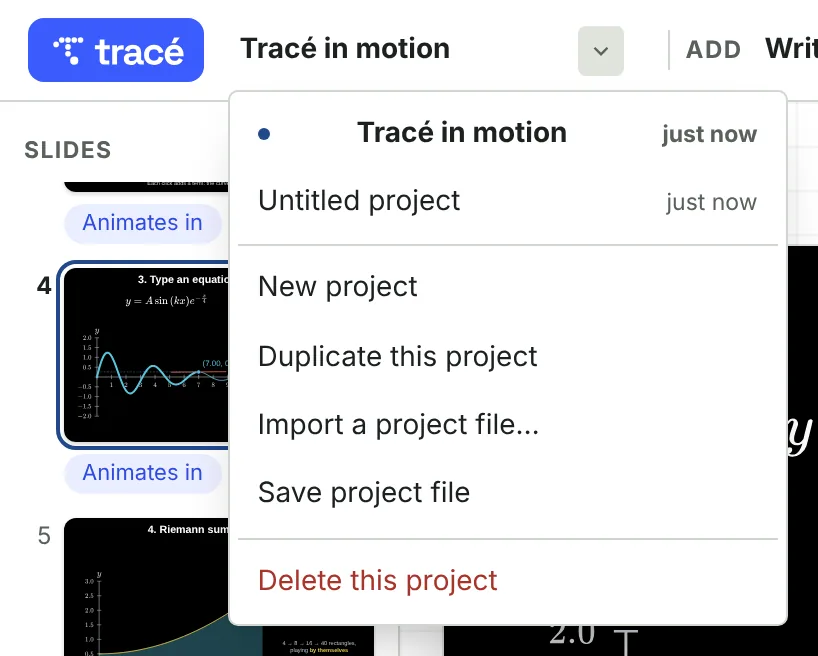
- Click a project to open it. They are sorted by when you last worked on them.
- Delete this project asks you to click twice, so nothing is deleted by accident. If you are signed in, its online copy is deleted too.
Creating an account
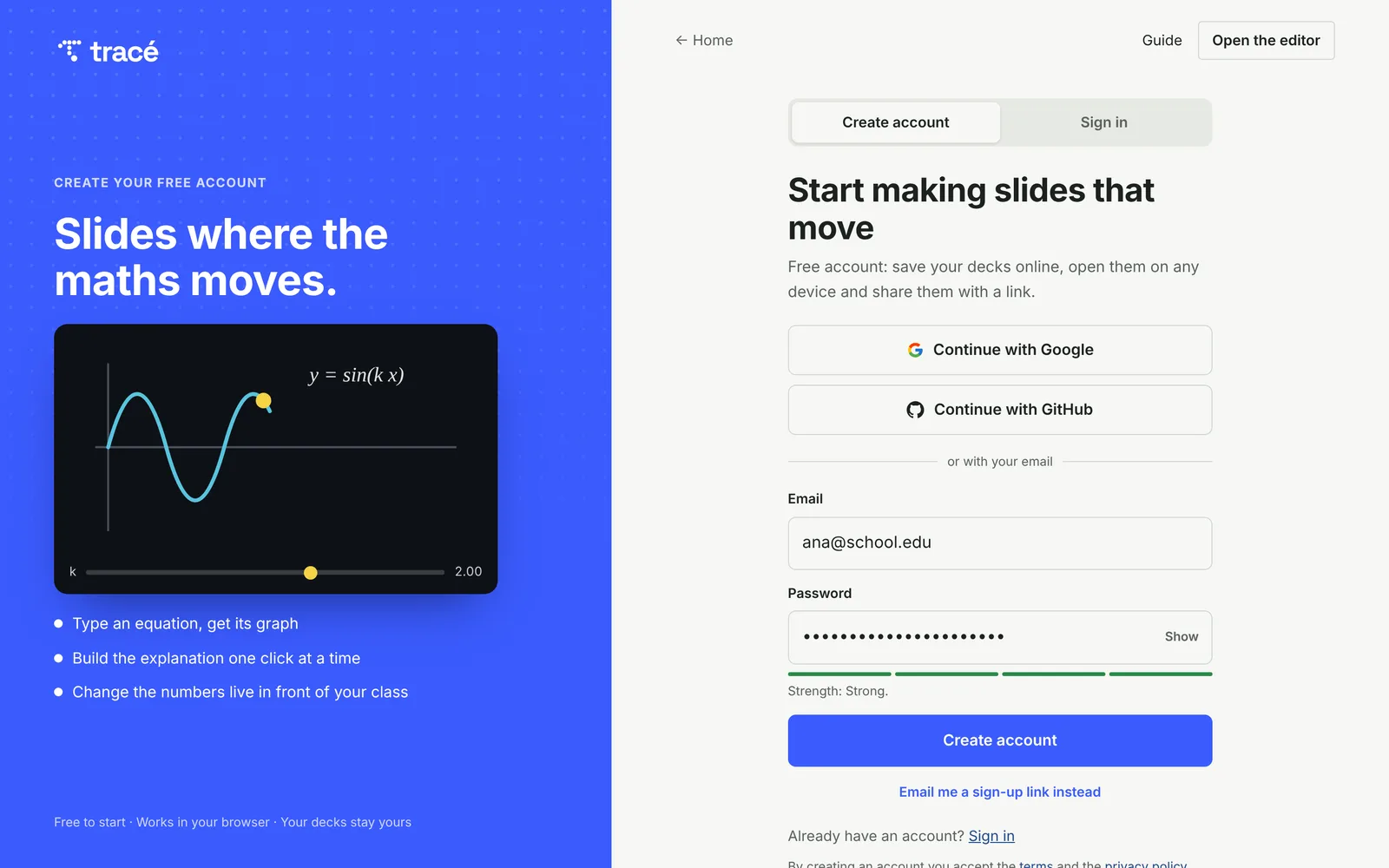
Press Sign in at the top right of the editor, or Sign in on the home page, and choose Create account. There are three ways in, and you can use any of them later:
- Email and password. Enter your email and a password of at least 8 characters, and press Create account. Tracé emails you a link to confirm the address; open it and you are in.
- Google or GitHub. Press Continue with Google or Continue with GitHub (when the site offers them). No new password needed.
- An email link. Press Email me a sign-up link instead. Tracé emails you a link that signs you in, with no password at all.
If you use Gmail, Outlook, Yahoo or iCloud, the screen after an emailed link has a button that opens your mailbox. No email after a minute? Look in your spam folder, then press Send it again. Open the link in the same browser where you asked for it.
Forgot your password?
On the sign-in page, press Forgot password?, enter your email and open the link Tracé sends you. Choose a new password and you are signed in. To add a password to an account you made with an email link or Google, or to change it, go to your account page → Sign-in and security.
Your profile
After the first link, Tracé asks for a short profile: your name and what you do (teacher, lecturer, student, science creator or something else). Your subject, your school or university and the colour of your badge are optional. Your projects are saved online only once the profile is complete. Until then, they stay on this device and the editor reminds you.
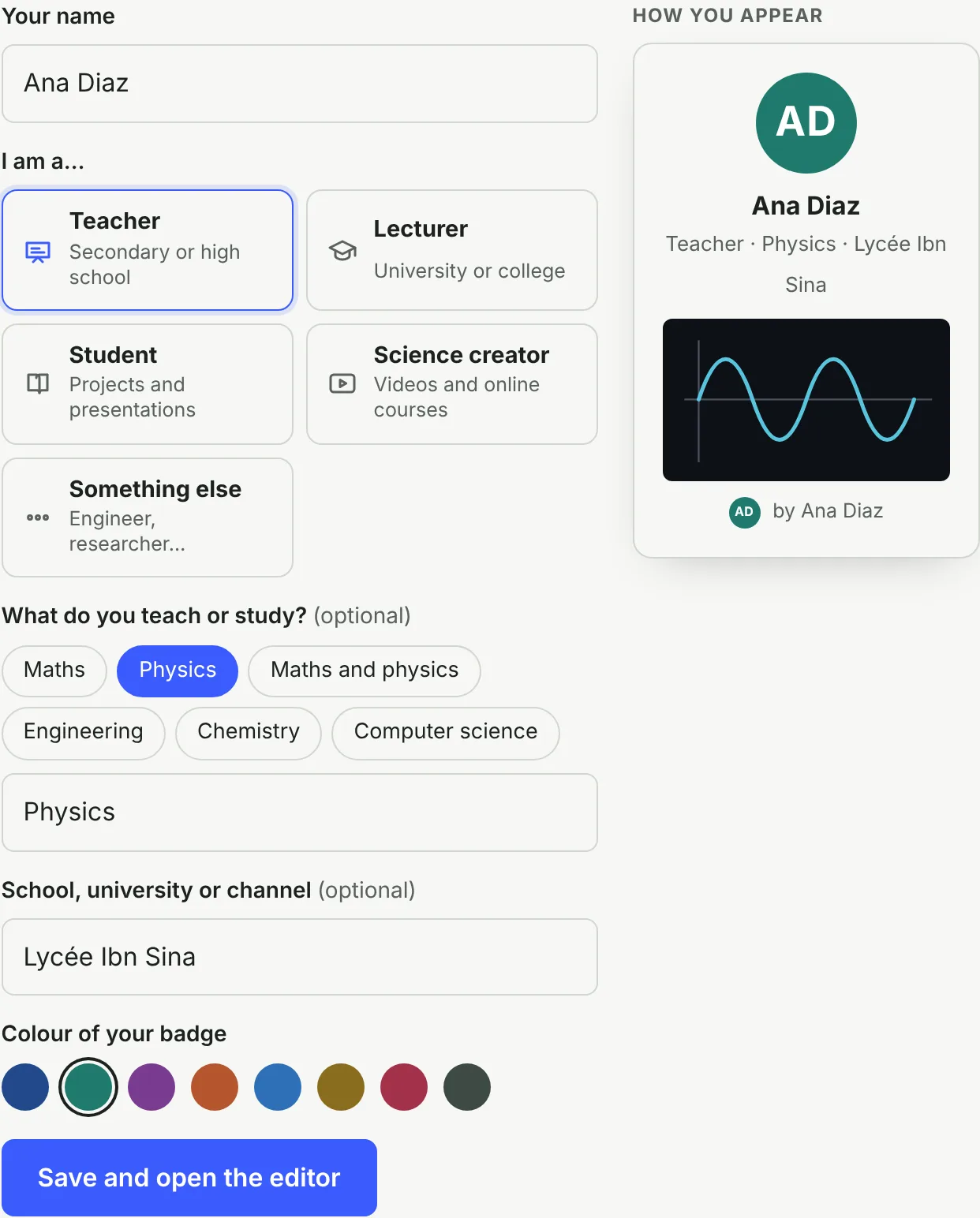
To change it later, open the account menu (your badge, top right) → Profile, plan and billing, or go to your account page.
Is my project saved?
Once you are signed in, the projects on this device are saved to your account, and your account’s projects appear in the project menu on every device you sign in on. A cloud next to the project name shows the state (on smaller screens only the cloud shows; point at it to read the state):

| It says | Meaning |
|---|---|
| Finish profile | Your profile is not complete yet, so nothing is saved online. Click it to finish. |
| Saved | The latest version is in your account. |
| Saving… | A change is on its way. Changes are saved a couple of seconds after you make them. |
| Device only | The free plan’s 3 online decks are used, so this one is only on this device. Delete a deck you no longer need, or upgrade. |
| Too big | The deck is over the size limit, usually because of large images. |
| Needs Pro | The deck has recorded voice, a Pro feature, so it stays on this device. Upgrade, or delete its voice clips. |
| Offline | No connection. Keep working: changes are kept on this device and saved when you are back online. |
Two devices at once? If you change the same deck on two devices, the most recent change wins. Close the deck on one device before working on the other.
Sharing a link
Press Share and tick Anyone with the link can watch this deck. Copy the link and send it.
Under People with the link can you choose what viewers may do:
- Move the sliders and turn 3D views themselves (on unless you switch it off). Viewers get the live sliders, a hint the first time, and ↺ Reset values to start again. Switch it off for a watch-only link.
- Make their own copy to change (off unless you switch it on). Viewers get a Make my own copy button that puts the deck into their own Tracé projects, free, with or without an account. Your deck never changes.
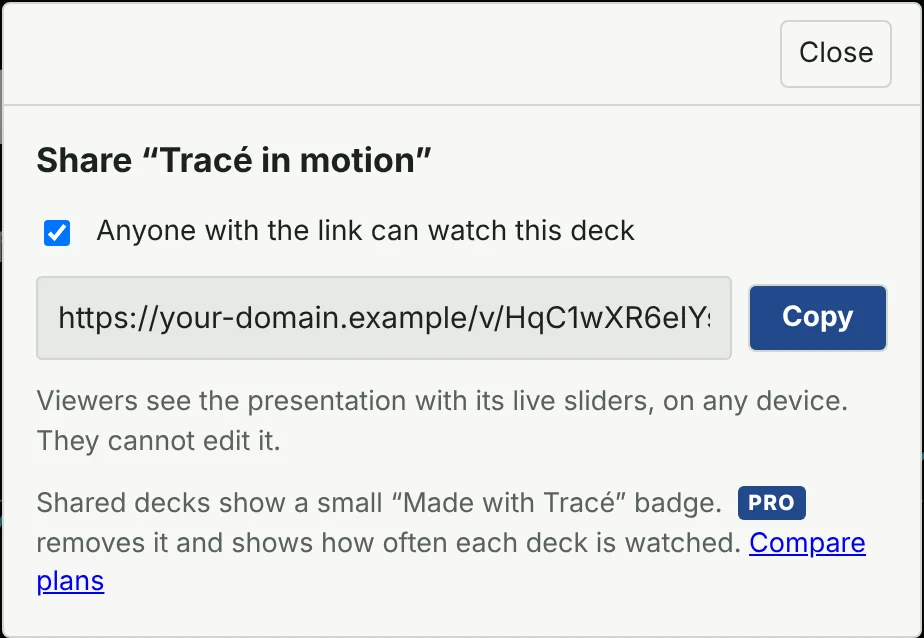
- Viewers see the presentation with its live sliders, on any device, without an account. They cannot edit it, and it is not copied into their own projects.
- The link always shows your latest version. Untick the box to stop sharing; the link then stops working. Ticking it again brings back the same link.
- Viewers see your name on the last screen (“by Ana Diaz”).
- On the free plan, shared decks show a small “Made with Tracé” badge. PRO removes it and shows how many times each shared deck was watched.
Project files
Save project file in the project menu downloads the whole project, images included, as one file. Keep it as a backup or send it to a colleague, who opens it with Import a project file… or by dragging the file onto the editor.
Making a video
⋯ → Make a video turns the whole project into an MP4 file: every slide and every click plays in order, with the same animations as when you present.
- Choose the quality (Full HD 1080p or the faster HD 720p) and how long to pause after each click. Clicks set to play automatically follow at once, and a click with recorded voice lasts as long as the voice.
- Press Make the video. The bar shows how far it has got; a 3-minute deck takes about 2 minutes on a laptop. Keep the tab open until it finishes.
- Watch it in the window, then press Download the video.
The video is made on your computer and nothing is uploaded. On the free plan it carries a small “Made with Tracé” badge in the corner; PRO removes it. Chrome or Edge on Windows and Mac make the most compatible files (they play in PowerPoint and QuickTime too).
The Manim script PRO
For a hand-tuned 3Blue1Brown-style video, ⋯ → Save as a file → Video script gives a Python file for Manim, the free animation engine used for many maths videos. Save it as deck.py. The first lines of the file list the commands:
pip install manim manim-slidesinstalls the tools (once).manim-slides render deck.py Presentationrenders the deck in high quality.manim-slides Presentationplays it as a clickable presentation.
For a single video file, run manim -qh deck.py Presentation instead. This needs Python on your computer; Manim’s website explains the setup.
On the free plan, ⋯ → Save as a file gives the Deck file, a copy of the project you can keep or load again.
Free and Pro
Everything you need to make and present slides is free. Pro adds advanced 3D, your recorded voice, videos without the badge and the Python video script, and is for people who keep many decks online and share them. Features marked PRO in the editor need Pro.
| Free | Pro | |
|---|---|---|
| The editor: every animation, and all text, maths, graphs, shapes and science objects | Yes | Yes |
| Present full screen with live sliders | Yes | Yes |
| Unlimited projects in your browser | Yes | Yes |
| Basic 3D shapes: sphere, cube, cylinder, cone, prism, pyramid | Yes | Yes |
| Advanced 3D: surfaces z = f(x, y), 3D scenes, polyhedra, torus, 3D arrows, turning views | No | Yes |
| Record your voice on slides and clicks | No | Yes |
| Make a video (MP4) of every click, with your voice | With the badge | No badge |
| Python video script (Manim) | No | Yes |
| Projects saved to your account | 3 | 50 |
| Online space in total | 5 MB | 200 MB |
| Export and import project files | Yes | Yes |
| Size of one project (images and voice included) | 2 MB | 20 MB |
| “Made with Tracé” badge | On share links and while presenting | None |
| See how often each shared deck is watched | No | Yes |
Pro costs $8 a month, or $72 a year. Sales tax or VAT is added where it applies.
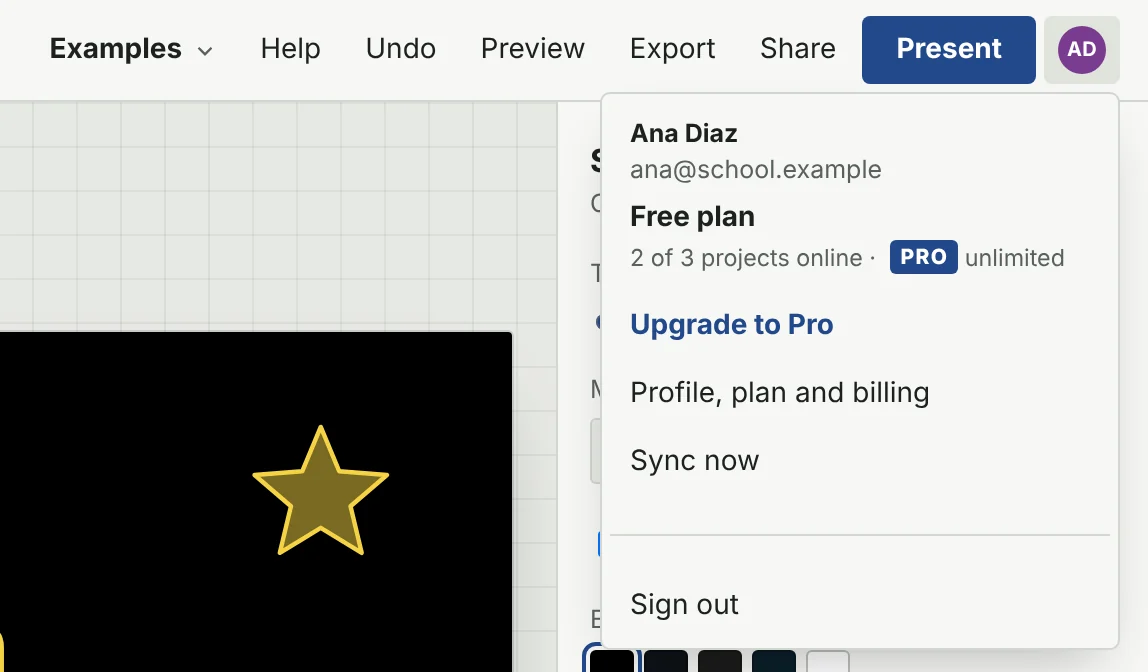
- Upgrade: account menu → Upgrade to Pro → choose monthly or yearly. Payment is handled by Paddle, our reseller. Pro switches on within seconds, and any “Device only” decks are saved online.
- Card, invoices, cancelling: account menu → Manage billing, or Manage billing on your account page.
- After cancelling, Pro lasts until the end of the period you paid for. No deck is ever deleted; above 3 decks you just cannot add new ones online.
- Refunds: within 14 days of a payment, see the refund policy.
Signing out and deleting your account
Sign out in the account menu or on your account page removes your account’s projects from this browser; they stay safe in your account. Do this on shared computers. If a project has changes that are not online yet, Tracé keeps it on the device.
To delete your account, open your account page → Delete my account, tick the confirmation and press the button. This deletes every project saved in your account and its share links. If you have Pro, cancel it in Manage billing first.
Shared decks show no ads and load no trackers. See the privacy policy.