Ready-made objects cover graphs, vectors, pendulums and fractals, but every teacher eventually wants something that is not in the menu: a wheel tracing a cycloid, a ladder sliding down a wall, a moving point with its velocity vector. In Tracé you can write it yourself in a few lines of calculator maths. No programming language, no rendering, and it plays live on the slide.
The idea: one line per thing, everything driven by time
A custom animation is a short script. Each line draws one thing: a point, a segment, an arrow, a circle, a curve, a filled polygon or a piece of text. Any number in it can depend on the time t, in seconds, or on u, which runs from 0 to 1 over the animation. When the object appears on the slide, time starts running and everything moves together.
# a wheel of radius 1 rolls two full turns
let a = 4 pi u
circle (a, 1) radius 1 color blue
point C = (a, 1) size 0.6 color blue
point P = (a - sin(a), 1 - cos(a)) color yellow trail label
line C to P color blue
curve y = 0 color grey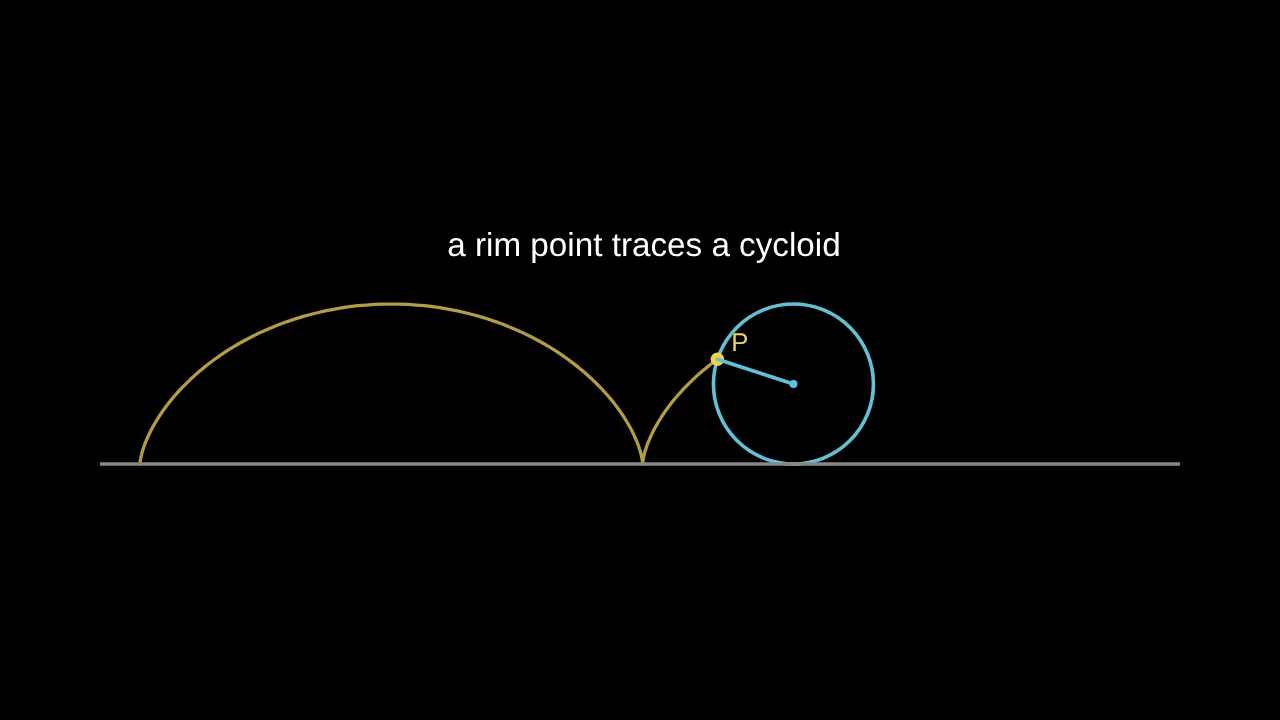
trail makes the rim point leave its path behind.The rolling condition is in the first line: when the wheel has turned through the angle a, its centre has moved a along the ground. The rim point is the centre minus the rotating radius, which gives the cycloid x = a − sin a, y = 1 − cos a. Students can read the physics straight from the script.
The whole language on one page
let a = 2 pi ukeeps a value that later lines can use.point P = (x, y)draws a dot. Points are named with a capital letter, and later lines can useP_xandP_y.Ois the origin.line A to Bandarrow A to Bjoin two points, named or written as pairs like(1, 2).circle C radius r,polygon A, B, C,curve y = sin(x - t)(a graph across the view) andpath (x(s), y(s)) for s from 0 to t(a curve that draws itself).text "v = {v} m/s" at (1, 2)writes text; the value in braces updates as it moves.- At the end of a line:
color,width,dashed,fill,trail,label,size, andafter 2oruntil 5to show something for part of the time only.
If a line has a mistake, a red note under the script says which line and what is wrong, and the rest keeps drawing. Start from one of the eight examples in the panel if you prefer to edit rather than write from scratch.
A classic problem: the sliding ladder
A 5 m ladder leans against a wall and slides down. What path does its midpoint follow? Students usually guess a curve that sags. The animation answers it in nine lines:
# a 5 m ladder slides down a wall
let a = 1.4 - 1.2 u
point A = (0, 5 sin(a)) label "A"
point B = (5 cos(a), 0) label "B"
line A to B color orange width 2
point M = ((A_x + B_x)/2, (A_y + B_y)/2) color yellow trail label "midpoint"
line (0, 0) to (0, 5.4) color grey width 1.5
line (0, 0) to (5.6, 0) color grey width 1.5
text "angle = {a} rad" at (4.3, 4.6)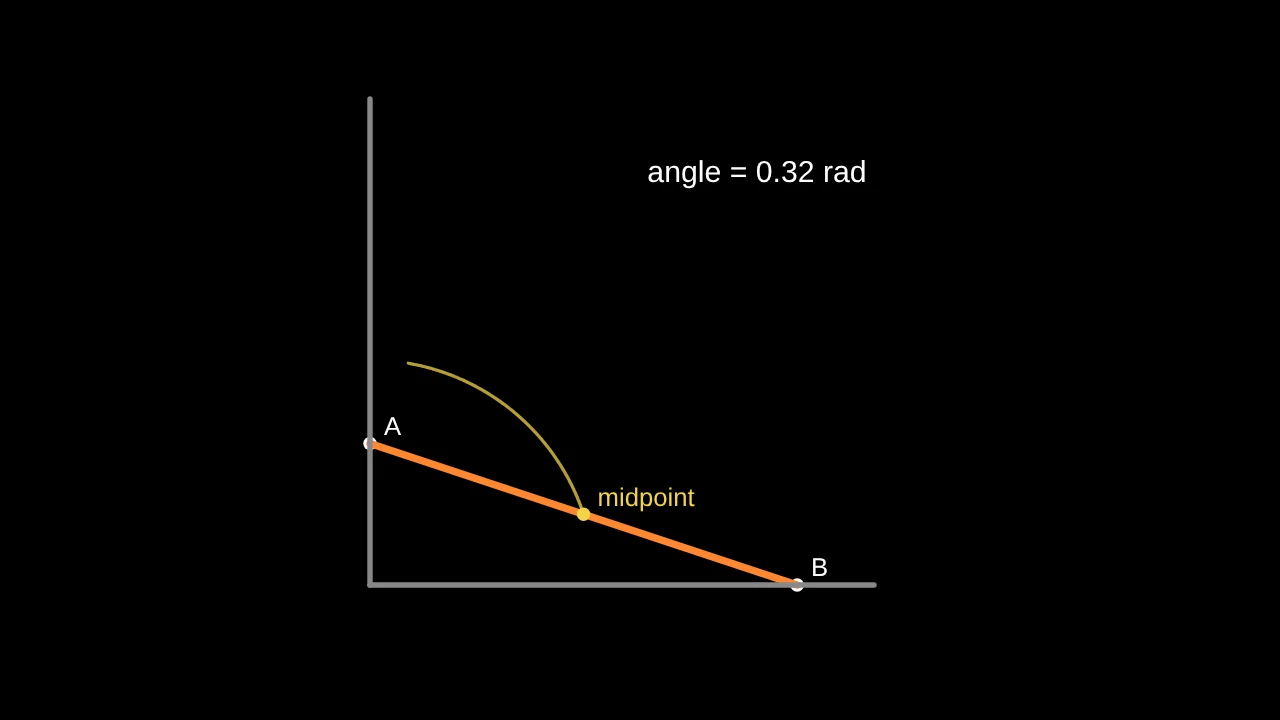
The trail is a quarter circle of radius 2.5 centred on the corner, because the midpoint of the hypotenuse is always half the hypotenuse from the right angle. Play it before telling the class, and let them explain why.
Playing it on a slide
- Once, when it appears: the usual choice. The next click waits until it has finished.
- Over and over: for repeating motion such as a pendulum, a wave or an orbit.
- Held still: time becomes a setting you animate on clicks, like any other. Set it to 2 s on click 1 and 6 s on click 2, and the motion advances step by step while you talk.
It also works in the video export, on share links and in the presenter view, and it can sit next to graphs, equations and drawings on the same slide.
Let the AI write it
Under the script, describe what you want (“a ball thrown at 45° with its velocity vector”, “make the wheel roll four turns and show the angle”) and press Write the script with AI. It writes the script, or changes the one you have, with the physics worked out and a view that fits. Every line stays editable. The AI deck builder uses the same language when a lesson needs a motion that no ready-made object gives.
Save it once, use it in every deck
Press Save to My library on any object, or on a whole slide, and it appears at the top of the Library menu in all your presentations. Signed in, the library follows you to your other devices.
Questions
Do I need to know a programming language?
No. The script is calculator maths with a few plain words (point, line, circle, curve). There are no loops, brackets of code or semicolons, and mistakes are explained line by line.
How is this different from Manim?
Manim is a Python library: you write a program and render a video. Here you write a few lines inside the slide editor and the motion plays live as you type, next to the rest of your lesson. You can still export a Manim script of the slide.
Can students write their own?
Yes, and it is a good exercise: to animate a cycloid or a ladder they have to find the position as a function of time, which is the mathematics of the problem.
More: Tracé as a Manim alternative, without code · How to create math slides, step by step